Take a schema called HR. An existing application connects as HR with a password. That connection is already in production, probably stored in a secret and used by several services. The application is working, so changing its authentication is not the problem we need to solve here.
This is not an application migration. It is a way to introduce IAM authentication for users while leaving the application’s existing database connection untouched.
The problem is the way users get access. Operations staff need to investigate a problem. Developers need to check a job. An administrator needs to make a small data correction. The HR password gets shared beyond the users who originally needed it.
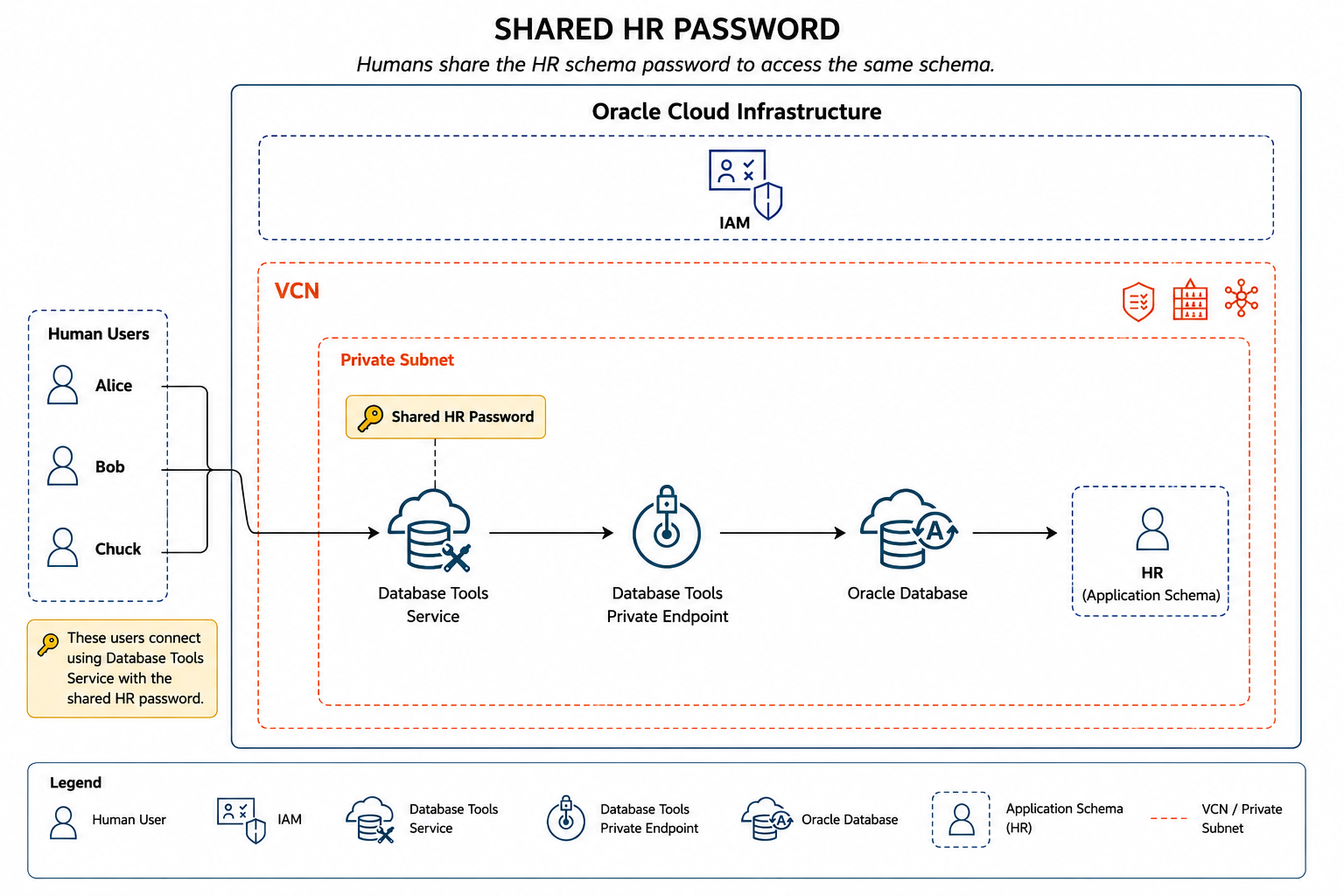
Once everybody has the same password, a database session as HR does not tell you which person used it. Password rotation is awkward too, because the application still relies on the same credential.
The safer approach is to leave the application alone and give users a separate way in.
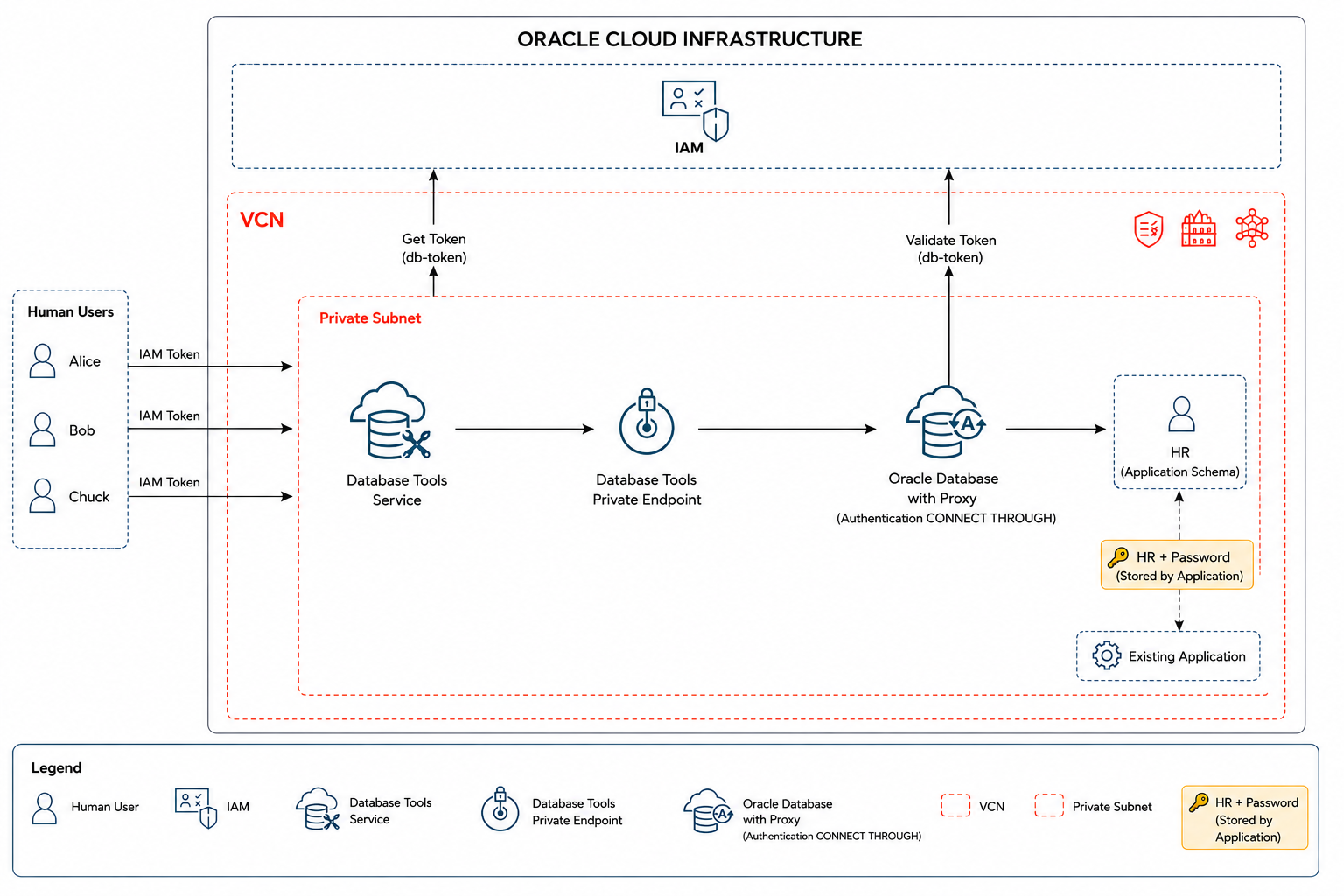
The application is still using HR/password. Alice, Bob, and Chuck are not. They authenticate with OCI IAM, land on a global database user named HR_IAM, and proxy into HR.
The only new path is for user access. The application connection string, password authentication, and HR schema remain exactly as they are.
This post builds on Integrating IAM Authentication with OCI Database Tools Connections and Using Database Tools IAM and Proxy Authentication for IoT Operations Data Access. Those posts cover the underlying IAM and Database Tools setup in more detail.
Before You Start
This post uses OCI Database Tools for a temporary administrator connection and a token-authenticated connection for users. It assumes:
HRalready exists and the application connection works.- The database supports OCI IAM authentication and Database Tools can reach it. A private database normally needs a Database Tools private endpoint.
- The database uses TCPS. IAM token authentication requires TLS.
- You can manage the database and use Vault secrets.
- The OCI CLI and
jqare installed.
For Autonomous Database, Database Tools already handles most of the token-connectivity work. For Base Database Service and Exadata, check the TLS wallet and server certificate setup before continuing. Oracle lists the service-specific requirements in its IAM Database Tools prerequisites.
Variables
export OCI_CLI_PROFILE="<your-oci-cli-profile>"
export OCI_CLI_REGION="<your-oci-region>"
export OCI_CLI_AUTH="<your-oci-cli-auth-method>"

export COMPARTMENT_OCID="ocid1.compartment.oc1..example"
export DATABASE_OCID="ocid1.autonomousdatabase.oc1..example"
export PRIVATE_ENDPOINT_OCID="ocid1.databasetoolsprivateendpoint.oc1..example"
export WALLET_SECRET_OCID="ocid1.vaultsecret.oc1..example"
export ADMIN_DB_PASSWORD_SECRET_OCID="ocid1.vaultsecret.oc1..example"

export DB_CONNECT_STRING='(description=(retry_count=3)(retry_delay=3)(address=(protocol=tcps)(port=1522)(host=example.adb.us-ashburn-1.oraclecloud.com))(connect_data=(service_name=example_high.adb.oraclecloud.com))(security=(ssl_server_dn_match=yes)))'
export DB_TOKEN_SCOPE="urn:oracle:db::id::$COMPARTMENT_OCID::$DATABASE_OCID"

export ADMIN_DB_USER="ADMIN"
export ADMIN_CONNECTION_NAME="hr-admin-setup"
export HR_IAM_CONNECTION_NAME="hr-user-iam-access"
For a wallet-backed connection, create the keystore JSON once:
export KEY_STORES_JSON="$(
  jq -nc \
    --arg walletSecretId "$WALLET_SECRET_OCID" \
    '[{
      keyStoreType: "SSO",
      keyStoreContent: {
        valueType: "SECRETID",
        secretId: $walletSecretId
      }
    }]'
)"
If the database does not use a wallet, omit --key-stores from the connection commands.
IAM Policy Required
This post assumes the OCI IAM group HR already exists and contains Alice, Bob, and Chuck. The group needs permission to use the Database Tools connection and generate the required database token.
Use a policy scoped to the database when possible:
allow group HR to use database-connections in compartment Production
  where target.database.id = '<database-ocid>'
Create that policy in the tenancy or confirm that an equivalent policy already exists.
The administrator who creates the Database Tools connections, private endpoint, and Vault-backed configuration needs a separate set of permissions. Oracle lists the required permissions in Required IAM Policies for Database Tools. The following is a broad connection-administration policy set for a group named DatabaseToolsConnectionAdministrators in MyCompartment:
allow group DatabaseToolsConnectionAdministrators to manage virtual-network-family in compartment MyCompartment
allow group DatabaseToolsConnectionAdministrators to manage database-family in compartment MyCompartment
allow group DatabaseToolsConnectionAdministrators to manage autonomous-database-family in compartment MyCompartment
allow group DatabaseToolsConnectionAdministrators to manage vaults in compartment MyCompartment
allow group DatabaseToolsConnectionAdministrators to manage secret-family in compartment MyCompartment
allow group DatabaseToolsConnectionAdministrators to manage database-tools-family in compartment MyCompartment
Replace MyCompartment with the relevant compartment name. The IAM users who set up or use this Database Tools access path also need the Database Tools, Vault, and secret permissions in their applicable compartment. Grant those statements to the group that represents those users, or use a separate administration group when your IAM model separates setup from day-to-day access.
Step 1: Create a Temporary Administrator Connection
The next few steps need a privileged database session. Create a password-authenticated Database Tools connection for that purpose. This is an administrator setup connection, not the connection Alice, Bob, and Chuck will use.
export ADMIN_CONNECTION_ID="$(
  oci dbtools connection create-oracle-database \
    --compartment-id "$COMPARTMENT_OCID" \
    --display-name "$ADMIN_CONNECTION_NAME" \
    --connection-string "$DB_CONNECT_STRING" \
    --user-name "$ADMIN_DB_USER" \
    --authentication-type PASSWORD \
    --user-password-secret-id "$ADMIN_DB_PASSWORD_SECRET_OCID" \
    --private-endpoint-id "$PRIVATE_ENDPOINT_OCID" \
    --key-stores "$KEY_STORES_JSON" \
    --runtime-support SUPPORTED \
    --runtime-identity AUTHENTICATED_PRINCIPAL \
    --wait-for-state SUCCEEDED \
    --query 'data.resources[?"entity-type" == `databasetoolsconnection`].identifier | [0]' \
    --raw-output
)"
If a suitable administrator connection already exists, set ADMIN_CONNECTION_ID to its OCID and skip this command. Omit wallet and private-endpoint options when they do not apply.
Step 2: Enable OCI IAM External Authentication
Use the administrator connection to configure OCI IAM as the database external identity provider:
oci dbtools-runtime property-set update oracle-database-external-authentication-details \
  --connection-id "$ADMIN_CONNECTION_ID" \
  --property-set-key ORACLE_DATABASE_EXTERNAL_AUTHENTICATION \
  --identity-provider '{"type":"OCI_IAM"}' \
  --force
Skip this command if IAM external authentication is already enabled. Check this before creating the global user; the mapping cannot work until the database can validate IAM authentication.
Step 3: Create the Global User and Proxy Relationship
HR is already a local, password-authenticated application user:
CREATE USER hr IDENTIFIED BY "password";
GRANT CREATE SESSION to hr;
Create the shared global user for the IAM group and let it proxy into HR:
CREATE USER hr_iam
  IDENTIFIED GLOBALLY AS 'IAM_GROUP_NAME=HR';

GRANT CREATE SESSION TO hr_iam;

ALTER USER hr
  GRANT CONNECT THROUGH hr_iam;
The direction is:
HR_IAM --> CONNECT THROUGH --> HRHR_IAM is the proxy user. HR is the proxy client and remains the schema used for SQL. For this auto-detect pattern, do not add AUTHENTICATION REQUIRED to the grant.
Run the new-user and proxy statements through the administrator connection:
export HR_IAM_SETUP_REQUEST="$(
  jq -nc '{
    type: "STANDARD",
    statementText:
      "CREATE USER hr_iam IDENTIFIED GLOBALLY AS '\''IAM_GROUP_NAME=HR'\''; " +
      "GRANT CREATE SESSION TO hr_iam; " +
      "ALTER USER hr GRANT CONNECT THROUGH hr_iam;"
  }'
)"

oci dbtools-runtime connection execute-sql sync \
  --connection-id "$ADMIN_CONNECTION_ID" \
  --request-input "$HR_IAM_SETUP_REQUEST"
If HR_IAM already exists, adjust the SQL to its actual state instead of re-running CREATE USER.
Step 4: Create the IAM Connection with Auto-Detect
This is the connection users will use. It authenticates with an IAM token and includes the proxy-client setting required for auto-detection:
{
  "proxyAuthenticationType": "USER_NAME_AUTO_DETECT"
}
Build the advanced properties JSON with the IAM database token scope:
export HR_IAM_ADVANCED_PROPERTIES_JSON="$(
  jq -nc \
    --arg tokenScope "$DB_TOKEN_SCOPE" \
    '{
      "iam.db.token.scope": $tokenScope
    }'
)"
export HR_IAM_CONNECTION_ID="$(
oci dbtools connection create-oracle-database \
--compartment-id "$COMPARTMENT_OCID" \
--display-name "$HR_IAM_CONNECTION_NAME" \
--connection-string "$DB_CONNECT_STRING" \
--authentication-type TOKEN \
--private-endpoint-id "$PRIVATE_ENDPOINT_OCID" \
--key-stores "$KEY_STORES_JSON" \
--advanced-properties "$HR_IAM_ADVANCED_PROPERTIES_JSON" \
--proxy-client '{"proxyAuthenticationType":"USER_NAME_AUTO_DETECT"}' \
--runtime-support SUPPORTED \
--runtime-identity AUTHENTICATED_PRINCIPAL \
--wait-for-state SUCCEEDED \
--query 'data.resources[?"entity-type" == `databasetoolsconnection`].identifier | [0]' \
--raw-output
)"There is no database --user-name in this command. Database Tools obtains a database token for the IAM-authenticated person; the HR group mapping resolves the token to HR_IAM.
What USER_NAME_AUTO_DETECT Does
Auto-detect does not look at Alice’s IAM name and guess that she should connect as HR. Database Tools resolves the caller to HR_IAM, then checks USER_PROXIES for an eligible proxy client. When there is exactly one, Database Tools uses it.
IAM identity
     |
     v
HR_IAM
     |
     | USER_PROXIES finds one proxy client
     v
HR
If HR_IAM can connect through to more than one eligible user, the choice is ambiguous and auto-detect cannot select one safely. Use an explicit proxy client for that design.
Step 5: Validate the Connection and Session
Run validation while authenticated to OCI as an IAM user in the HR group:
oci dbtools-runtime connection validate oracle-database \
  --connection-id "$HR_IAM_CONNECTION_ID"
Then inspect the resulting database session:
export IDENTITY_CHECK_REQUEST="$(
  jq -nc '{
    type: "STANDARD",
    statementText:
      "SELECT SYS_CONTEXT('\''USERENV'\'', '\''SESSION_USER'\'') AS session_user, " +
      "SYS_CONTEXT('\''USERENV'\'', '\''PROXY_USER'\'') AS proxy_user, " +
      "SYS_CONTEXT('\''USERENV'\'', '\''CURRENT_USER'\'') AS current_user, " +
      "SYS_CONTEXT('\''USERENV'\'', '\''AUTHENTICATION_METHOD'\'') AS authentication_method " +
      "FROM dual"
  }'
)"

oci dbtools-runtime connection execute-sql sync \
  --connection-id "$HR_IAM_CONNECTION_ID" \
  --request-input "$IDENTITY_CHECK_REQUEST"
The result should have this shape:
SESSION_USER           HR
PROXY_USER             HR_IAM
CURRENT_USER           HR
AUTHENTICATION_METHOD  PROXYUSER_AUTHENTICATED_PROXY
SESSION_USER and CURRENT_USER show HR, because the proxy session landed in the application schema. PROXY_USER shows HR_IAM, the shared global database user used for the proxy hop.
One auditing detail is easy to miss. PROXY_USER = HR_IAM does not prove that Alice, rather than Bob or Chuck, ran a statement. They share the IAM group mapping. The individual identity belongs in the IAM token and audit records. Depending on database and audit configuration, AUTHENTICATED_IDENTITY and ENTERPRISE_IDENTITY from SYS_CONTEXT('USERENV', ...) can expose that identity in the session as well.
This is useful in environments with many existing applications. IAM-based access can be introduced for users one application schema at a time, without requiring every application to change its database authentication on the same day.
Cleanup
Delete the IAM Database Tools connection when testing is complete:
oci dbtools connection delete \
  --connection-id "$HR_IAM_CONNECTION_ID" \
  --force
If the temporary administrator connection was created only for this walkthrough, delete it too:
oci dbtools connection delete \
  --connection-id "$ADMIN_CONNECTION_ID" \
  --force
References
- Prerequisites for IAM-authenticated Database Tools connections
- Required IAM Policies for Database Tools
- Use Proxy Authentication with IAM Authentication
- Oracle Database Connections
- OCI CLI
dbtools connection create-oracle-database - Use Identity and Access Management Authentication with Base Database Service
Final Takeaway
The application still uses HR/password. Users use OCI IAM, connect through HR_IAM, and arrive in the same HR schema through the proxy relationship. That gives the team a better access path without forcing an application change.